How to Show the Ruler in Google Docs
View > Show ruler turns it on or off. Plus how to set margins, indents and tab stops with it, and why the ruler can be missing.
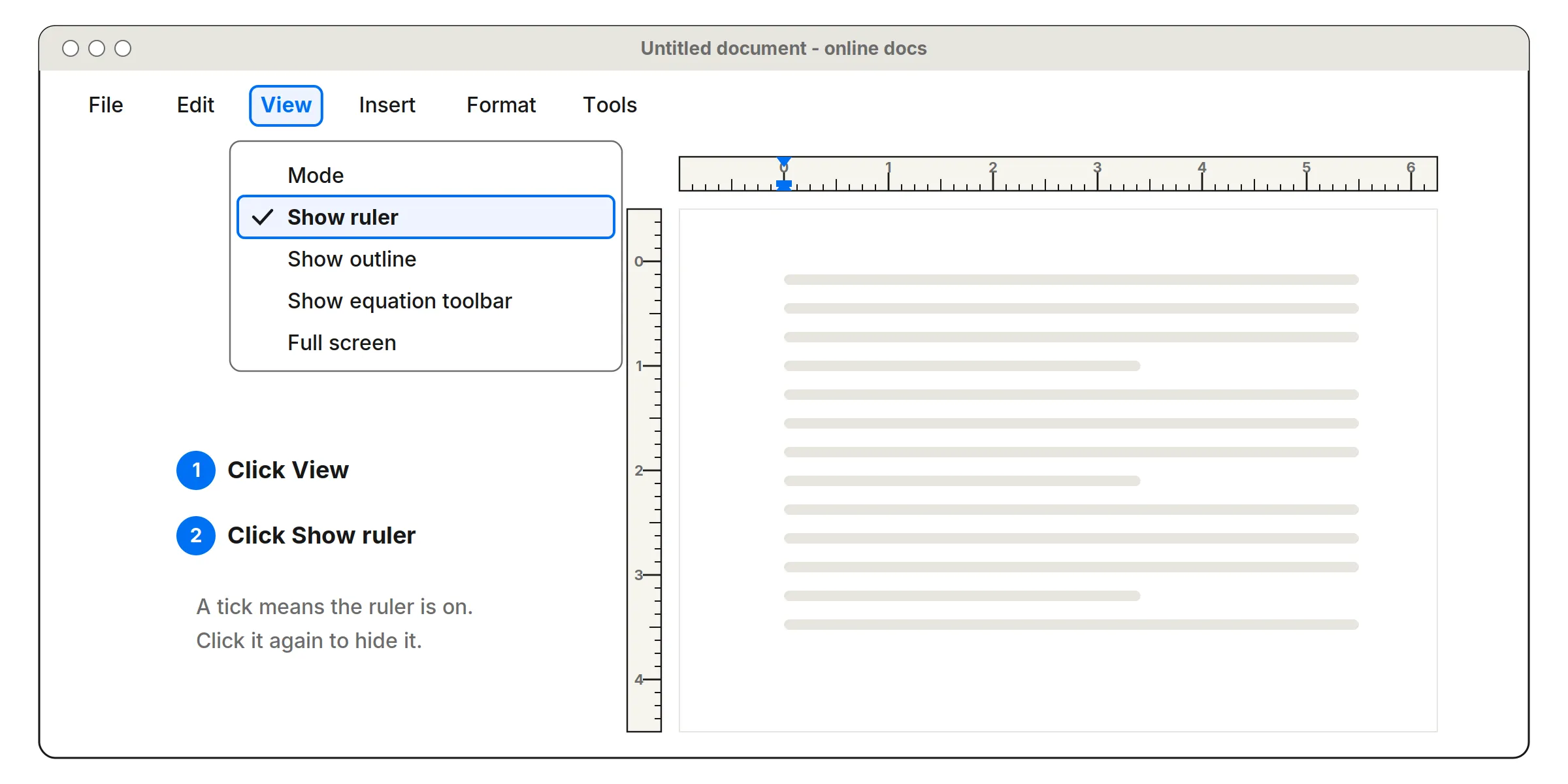
To show the ruler in Google Docs, click View in the menu at the top of your document, then click Show ruler. A tick next to it means the ruler is on. The same click hides it again.
Show or hide the ruler
- Open your document in Google Docs on a computer.
- Click View at the top.
- Click Show ruler.
The ruler appears above the page, and a vertical ruler runs down the left side. Google Docs normally shows the ruler when you open a document, so if it’s gone, someone turned it off with this same option.
No View menu?
If you can’t see File, Edit, View at the top, the menus are hidden. Press Ctrl+Shift+F (on a Mac, Cmd+Shift+F), or click the small arrow at the top right of the toolbar, to bring them back.
Missing the vertical ruler
The vertical ruler measures the page from top to bottom. If your document uses the Pageless format, which has no page breaks, you may only see the ruler across the top. To switch back to pages, go to File > Page setup and choose Pages.
Use the ruler for margins and indents
- Gray ends of the ruler are the page margins. Drag the boundary between gray and white to change a margin for the whole document.
- Blue downward triangle sets the left indent for the selected paragraphs.
- Blue bar above it sets the first-line indent, for paragraphs that start further in.
- Blue triangle at the right sets the right indent.
Select the paragraphs first. Indent markers only move the text you’ve selected, while margins change the whole document.
Add tab stops
Click a spot on the ruler, and Google Docs asks what kind of tab stop to add: left, center, right or decimal. Press Tab in your text to jump to it. To remove a tab stop, drag it down off the ruler.
Phones and tablets
The Google Docs apps for Android and iPhone don’t have a ruler. Open the document in a web browser on a computer to use one.
Measuring real objects
The Docs ruler measures your page, and it scales with zoom, so it won’t match a real ruler held against the screen. To measure something physical on your display, use a ruler calibrated to your screen, such as our inch ruler or cm ruler. Or print our printable ruler at 100%.
Frequently asked questions
How do I show the ruler in Google Docs?
At the top of the document, click View, then click Show ruler. A tick next to it means the ruler is on. Click it again to hide the ruler.
Why is there no ruler in the Google Docs app?
The ruler is part of Google Docs in a web browser on a computer. The phone and tablet apps don't show one, so open the document in Chrome or another browser on a computer to use it.
How do I add a tab stop with the ruler in Google Docs?
Select the paragraphs, click the spot on the ruler where you want the tab, and choose a left, center, right or decimal tab stop from the menu that appears. Drag a tab stop off the ruler to remove it.
Why can't I see the View menu in Google Docs?
The menus are probably hidden. Click the small arrow at the top right of the toolbar, or press Ctrl+Shift+F (Cmd+Shift+F on a Mac), to show them again.
Is the Google Docs ruler accurate for measuring things?
No. It measures the page you're writing on and changes with the zoom level, so it won't match a real ruler held against your screen. Use a calibrated online ruler for that.
More measuring guides
- How to Read a Ruler (Inches and Centimeters)
- How to Read a Tape Measure
- How to Measure Without a Ruler
- Fraction to Decimal Inch Chart (with Millimeters)
- How to Measure Your Ring Size at Home
- Paper Sizes Chart (Inches and Millimeters)
- US Coin Sizes: Diameter, Thickness and Weight
- How to Use a Protractor
- How to Measure Your Height at Home
- How to Measure a TV or Monitor Screen Size
- How to Measure Your Foot for Shoe Size
- How to Measure Your Wrist for a Bracelet or Watch
- Picture Frame Sizes: Standard US and Metric Chart
- Lumber Sizes: Actual vs Nominal Dimensions Chart
- Mattress and Bed Size Chart: US Dimensions in Inches and cm
- Ring Size Chart: US, UK, EU and Japan Conversion
- Necklace Length Chart: How Each Chain Length Fits
- Free Printable Ruler Worksheets with Answer Keys
- Screw and Bolt Size Chart: US and Metric
- Drill Bit Size Chart: Inch, Metric and Tap Drill Sizes
- Nail Size Chart: Penny Sizes Explained
- Envelope Sizes Chart: US and International
- Business Card Size: Standard Dimensions by Country
- Poster Sizes Chart: US and International
- Hat Size Chart: How to Find Your Hat Size
- Pandora Ring Size Chart: Pandora to US and UK Sizes
- Cartier Ring Size Chart: Cartier to US and UK Sizes
- How to Measure for Curtains in 5 Steps
- How High to Hang Curtains (and Why Higher Looks Better)
- Curtain Size Chart: Standard Lengths and Widths
- Wrench Size Chart: SAE vs Metric, Sockets and Allen Keys
- Wire Gauge Chart: AWG Sizes in Inches and mm
- Pipe Size Chart: Nominal vs Actual Sizes
- Sandpaper Grit Chart: Which Grit for Which Job
- Thread Pitch Chart: UNC, UNF and Metric Threads
- Sheet Metal Gauge Chart: Thickness in Inches and mm
- Extension Cord Gauge Chart: Length, Amps and AWG
- Rebar Size Chart: US Bar Sizes, Diameter and Weight
- Plywood and Drywall Thickness: Nominal vs Actual
- Tap Drill Size Chart: UNC, UNF and Metric
- Number and Letter Drill Size Chart
- Bolt Torque Chart: SAE Grades and Metric Classes
- Washer Size Chart: SAE, USS and Metric Washers
- How to Show the Ruler in Word
- How to Show the Ruler in PowerPoint
- Is an Online Ruler Accurate? How to Calibrate It
- How to Measure Inches on Your Phone
- How Big Is 1 Inch? Everyday Objects That Are an Inch
- How Big Is 1 cm and 1 mm? Real-Life Comparisons
- How to Measure PD (Pupillary Distance) for Glasses
- Ear Gauge Size Chart: Gauge to mm and Inches
- Bra Size Chart and How to Measure for a Bra