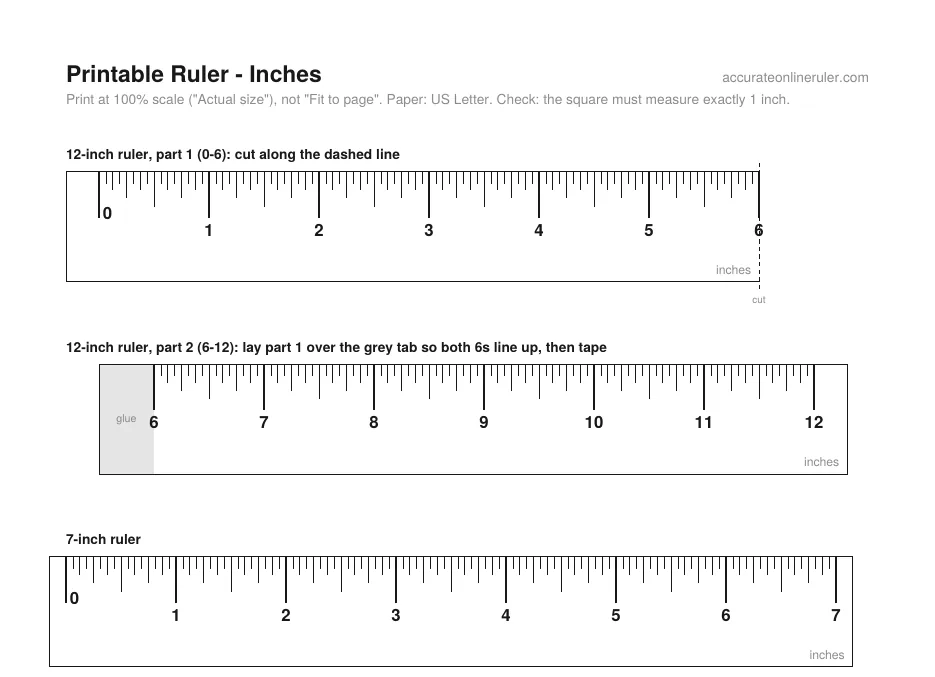
How to print a ruler at actual size
Printers often shrink pages to fit the paper, which makes a printed ruler too small. These PDFs are drawn at exact size, and each page has a check square so you can confirm the printout is right before you measure.
Related guides: How to Read a Ruler (Inches and Centimeters) · How to Read a Tape Measure
How to use it
- Download the PDF for your paper: US Letter in the US, Canada and Mexico, A4 elsewhere.
- In the print window, set scale to 100% or Actual size. Turn off “Fit to page” and “Shrink to fit”.
- Check the square: it should measure exactly 1 inch (or 2 cm). For the 12-inch ruler, cut out both parts and tape them where the 6s line up.
Good to know
- Page 1 has inch rulers marked to 1/16 inch; page 2 has centimeter rulers marked every millimeter.
- Printing on card stock or thick paper gives a stiffer ruler that lasts longer.
- No printer at hand? The on-screen ruler above works at actual size after calibration.
Three ways to calibrate
Auto-detect your device
The ruler recognizes about 130 phones, tablets, laptops and monitors, including iPhones, Galaxy phones, Pixels and MacBooks.
Enter your screen size
Enter your screen's diagonal size (for example, 15.6" for a laptop), and the ruler works out the scale from your screen resolution.
Calibrate with a bank card
Hold any bank card against the outline on screen and move the slider until they match. Bank cards are the same size everywhere: 85.60 × 53.98 mm.
How accurate is the ruler?
How accurate the ruler is depends on how well it knows your screen's pixel density, meaning how many pixels fit in an inch. There are three ways to set it, from most to least accurate:
Bank card (±0.5%): Bank and credit cards are made to one worldwide size, 85.60 × 53.98 mm (ISO/IEC 7810 ID-1). Because every card is exactly the same, matching one on screen gives the most accurate result.
Auto-detect (±1%): The ruler looks up your device's published screen size and resolution. Screens of the same model can differ very slightly, so this is a little less exact. It covers about 130 devices.
Screen size (±2%): You type in your screen size, and the ruler works out the rest from your resolution. Advertised sizes are rounded (a "15.6-inch" screen may really be 15.59 inches), so this is the least exact method. It's a good fallback when you don't have a card.
Real-life objects to check your measurements
Use these everyday objects to confirm the ruler is calibrated correctly.
Bank or credit card: 85.60 × 53.98 mm (3.37 × 2.13 in)
A4 paper: 210 × 297 mm (8.27 × 11.69 in)
US Letter paper: 8.5 × 11 in (215.9 × 279.4 mm)
US quarter: 24.26 mm (0.955 in) across
1 euro coin: 23.25 mm (0.915 in) across
AA battery: about 50.5 mm long and 14.5 mm wide
More online rulers
Measuring guides
- How to Read a Ruler (Inches and Centimeters)
- How to Read a Tape Measure
- How to Measure Without a Ruler
- How to Measure Your Ring Size at Home
- Paper Sizes Chart (Inches and Millimeters)
- How to Use a Protractor
- How to Measure Your Foot for Shoe Size
- How to Measure Your Wrist for a Bracelet or Watch
- Picture Frame Sizes: Standard US and Metric Chart
- Lumber Sizes: Actual vs Nominal Dimensions Chart
- Free Printable Ruler Worksheets with Answer Keys
- Nail Size Chart: Penny Sizes Explained
- Hat Size Chart: How to Find Your Hat Size
- How to Measure for Curtains in 5 Steps
- How High to Hang Curtains (and Why Higher Looks Better)
- Sandpaper Grit Chart: Which Grit for Which Job
- How to Show the Ruler in Word
- How to Show the Ruler in Google Docs
- Is an Online Ruler Accurate? How to Calibrate It
- How to Measure Inches on Your Phone
- How Big Is 1 Inch? Everyday Objects That Are an Inch
- How Big Is 1 cm and 1 mm? Real-Life Comparisons
- How to Measure PD (Pupillary Distance) for Glasses
- Bra Size Chart and How to Measure for a Bra
- All guides →