How to Measure a TV or Monitor Screen Size
Why screens are measured diagonally, how to measure one in a minute, the real width and height of common TV sizes, and how to check a TV will fit a space.
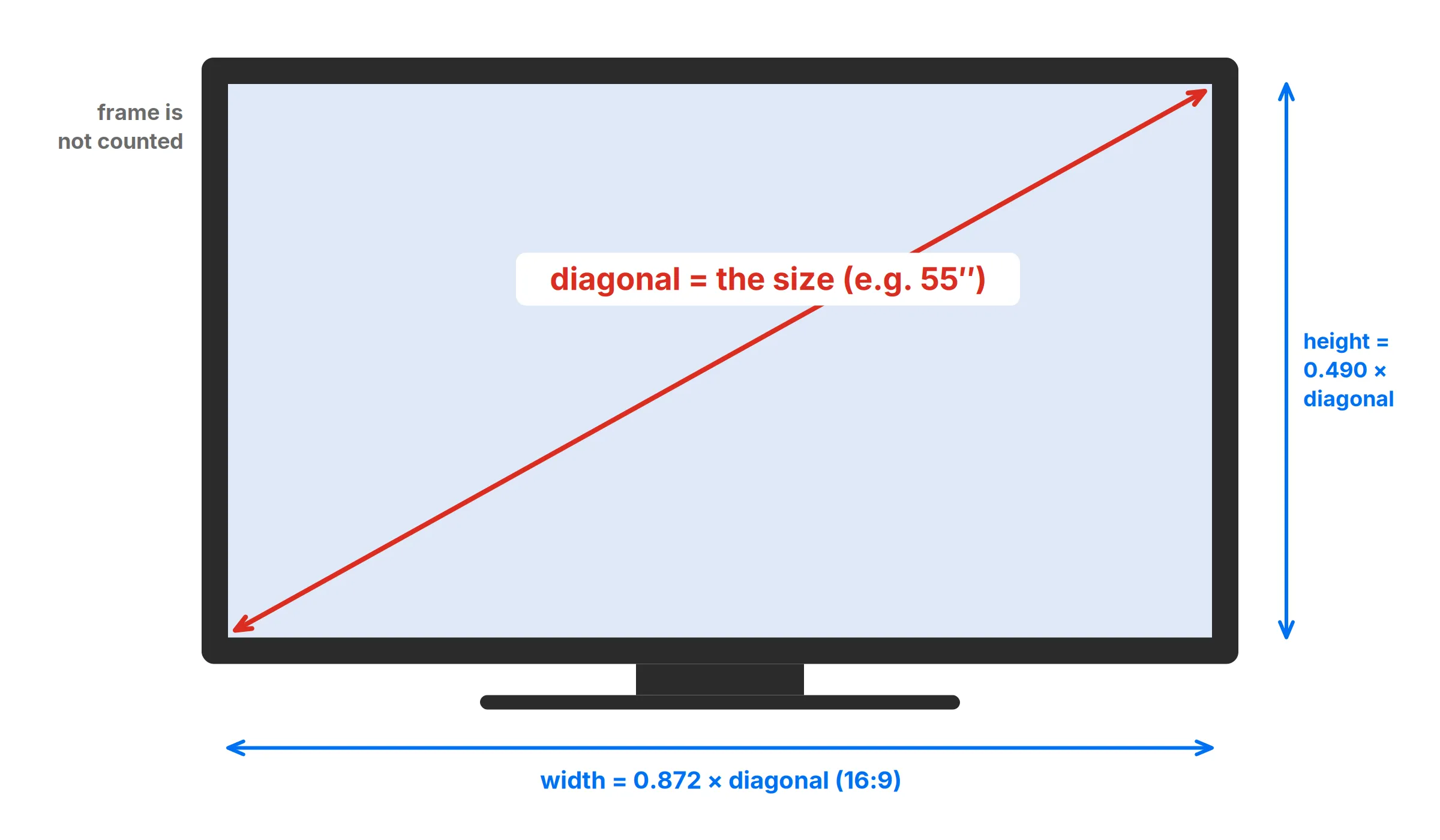
A screen’s size is the length of its diagonal: a straight line from one corner of the picture to the opposite corner. It doesn’t include the frame (the bezel) or the stand. That’s true for TVs, computer monitors, laptops, tablets and phones alike, and it’s why a “55-inch” TV is nowhere near 55 inches wide.
How to measure a screen
- Turn the screen off so you can see exactly where the picture area ends.
- Hook a tape measure on the bottom-left corner of the visible screen, not the edge of the frame.
- Stretch it to the top-right corner of the visible screen and read the length in inches. Round to the nearest inch for a TV, or the nearest tenth for a laptop.
- For width and height, measure straight across and straight up the visible area the same way.
A soft tape measure is easiest. With a rigid one, keep it clear of the screen surface, because pressing on some panels can damage them. If you’re measuring a laptop, the screen is usually 13–16 inches, so a 12-inch ruler won’t reach corner to corner. Measure the width and height instead and let the screen size calculator work out the diagonal.
Width and height from the diagonal
Screens are sold by diagonal, but what decides whether one fits a space is its width and height. Those depend on the shape, or aspect ratio. Almost every TV and most monitors are 16:9, which gives:
- width = 0.872 × diagonal
- height = 0.490 × diagonal
| TV size | Screen width | Screen height | Sit at least (30°) | Cinema-like (40°) |
|---|---|---|---|---|
| 32″ | 27.9 in (71 cm) | 15.7 in (40 cm) | 4.3 ft | 3.2 ft |
| 43″ | 37.5 in (95 cm) | 21.1 in (54 cm) | 5.8 ft | 4.3 ft |
| 50″ | 43.6 in (111 cm) | 24.5 in (62 cm) | 6.8 ft | 5.0 ft |
| 55″ | 47.9 in (122 cm) | 27.0 in (68 cm) | 7.5 ft | 5.5 ft |
| 65″ | 56.7 in (144 cm) | 31.9 in (81 cm) | 8.8 ft | 6.5 ft |
| 75″ | 65.4 in (166 cm) | 36.8 in (93 cm) | 10.2 ft | 7.5 ft |
| 85″ | 74.1 in (188 cm) | 41.7 in (106 cm) | 11.5 ft | 8.5 ft |
The last two columns are the seating distances at which the screen fills 30° and 40° of your view. 30° is the minimum SMPTE recommends for a home screen, and about 40° is the more immersive figure THX recommends. Sitting anywhere between the two is a sensible range; with a 4K TV you can sit at the closer end without seeing pixels.
Monitors and laptops
Monitors and laptops come in more shapes, so work out the width from the right ratio:
- 24″ 16:9 monitor: 20.9 × 11.8 in (53 × 30 cm)
- 27″ 16:9 monitor: 23.5 × 13.2 in (60 × 34 cm)
- 34″ 21:9 ultrawide: 31.3 × 13.4 in (79 × 34 cm)
- 14″ 16:10 laptop: 11.9 × 7.4 in (30 × 19 cm)
On a Mac, the built-in screen size is listed under Apple menu → About This Mac. Windows doesn’t show the physical size, but you can find it from the model number, or open our screen size calculator on that screen, calibrate it with a bank card, and read its size directly.
Will it fit? Measure the TV, not just the screen
The table above is the picture area. The TV itself is wider and taller by the frame, typically a few millimeters to about an inch on each side on modern sets, and the stand adds height and needs its own depth. Before buying a TV for a cabinet or a niche:
- Look up the maker’s dimensions without stand (width × height × depth).
- Measure the space, and leave at least 1–2 inches around the TV for air to flow.
- For a TV on its stand, check the stand footprint. Some stands sit at the ends of the TV, so they need a surface nearly as wide as the TV itself.
Screen size and pixel density
Two screens of the same size can look very different in sharpness. Pixel density (PPI) tells you how tightly the pixels are packed: divide the diagonal resolution by the diagonal size. A 27-inch 2560 × 1440 monitor has √(2560² + 1440²) = 2937 pixels on the diagonal, so 2937 ÷ 27 = 109 PPI. A 27-inch 4K (3840 × 2160) monitor has 163 PPI. The screen size calculator does this for you when you add the resolution, and pixels to inches converts sizes at any pixel density.
Frequently asked questions
Is TV size measured diagonally?
Yes. TVs, monitors, laptops and phones are all sold by the diagonal of the visible screen, measured from one corner to the opposite corner. The frame around the screen is not included.
How wide is a 55-inch TV?
The screen of a 55-inch 16:9 TV is about 47.9 inches wide and 27.0 inches tall (122 × 68 cm). The TV itself is slightly larger because of the frame, so check the maker's dimensions before buying a stand or cabinet.
How do I measure my TV without a tape measure?
Look for the size in the model number: most brands put it there, such as 55 in a model name ending 55…. Or measure the screen's width and height with any ruler and enter them in our screen size calculator, which works out the diagonal.
Why does my 65-inch TV measure 64.5 inches?
Many TVs are sold by size class. The panel in a "65-inch class" TV can measure a little less, such as 64.5 inches, across the diagonal. The exact figure is in the specifications, usually listed as the screen size measured diagonally.
More measuring guides
- How to Read a Ruler (Inches and Centimeters)
- How to Read a Tape Measure
- How to Measure Without a Ruler
- Fraction to Decimal Inch Chart (with Millimeters)
- How to Measure Your Ring Size at Home
- Paper Sizes Chart (Inches and Millimeters)
- US Coin Sizes: Diameter, Thickness and Weight
- How to Use a Protractor
- How to Measure Your Height at Home
- How to Measure Your Foot for Shoe Size
- How to Measure Your Wrist for a Bracelet or Watch
- Picture Frame Sizes: Standard US and Metric Chart
- Lumber Sizes: Actual vs Nominal Dimensions Chart
- Mattress and Bed Size Chart: US Dimensions in Inches and cm
- Ring Size Chart: US, UK, EU and Japan Conversion
- Necklace Length Chart: How Each Chain Length Fits
- Free Printable Ruler Worksheets with Answer Keys
- Screw and Bolt Size Chart: US and Metric
- Drill Bit Size Chart: Inch, Metric and Tap Drill Sizes
- Nail Size Chart: Penny Sizes Explained
- Envelope Sizes Chart: US and International
- Business Card Size: Standard Dimensions by Country
- Poster Sizes Chart: US and International
- Hat Size Chart: How to Find Your Hat Size
- Pandora Ring Size Chart: Pandora to US and UK Sizes
- Cartier Ring Size Chart: Cartier to US and UK Sizes
- How to Measure for Curtains in 5 Steps
- How High to Hang Curtains (and Why Higher Looks Better)
- Curtain Size Chart: Standard Lengths and Widths
- Wrench Size Chart: SAE vs Metric, Sockets and Allen Keys
- Wire Gauge Chart: AWG Sizes in Inches and mm
- Pipe Size Chart: Nominal vs Actual Sizes
- Sandpaper Grit Chart: Which Grit for Which Job
- Thread Pitch Chart: UNC, UNF and Metric Threads
- Sheet Metal Gauge Chart: Thickness in Inches and mm
- Extension Cord Gauge Chart: Length, Amps and AWG
- Rebar Size Chart: US Bar Sizes, Diameter and Weight
- Plywood and Drywall Thickness: Nominal vs Actual
- Tap Drill Size Chart: UNC, UNF and Metric
- Number and Letter Drill Size Chart
- Bolt Torque Chart: SAE Grades and Metric Classes
- Washer Size Chart: SAE, USS and Metric Washers
- How to Show the Ruler in Word
- How to Show the Ruler in Google Docs
- How to Show the Ruler in PowerPoint
- Is an Online Ruler Accurate? How to Calibrate It
- How to Measure Inches on Your Phone
- How Big Is 1 Inch? Everyday Objects That Are an Inch
- How Big Is 1 cm and 1 mm? Real-Life Comparisons
- How to Measure PD (Pupillary Distance) for Glasses
- Ear Gauge Size Chart: Gauge to mm and Inches
- Bra Size Chart and How to Measure for a Bra