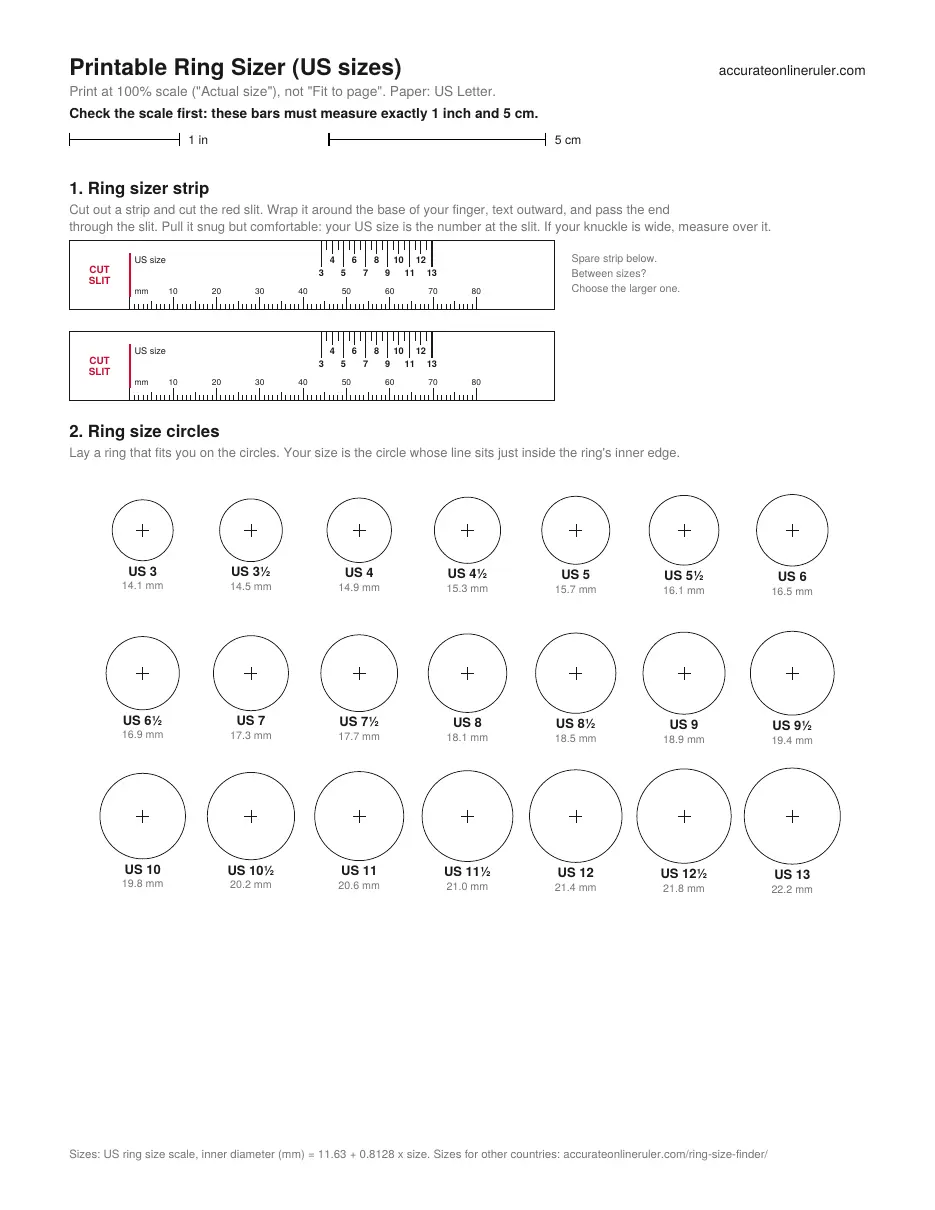
How to use the printable ring sizer
The PDF gives you two ways to find a size. The strip measures your finger: wrap it around, and the number at the slit is your US size. The circles size a ring you already own: lay it on them and find the circle that matches its inside edge. Both use the standard US scale, where each full size adds about 0.81 mm to the inner diameter.
Related guides: How to Measure Your Ring Size at Home · Ring Size Chart: US, UK, EU and Japan Conversion
How to use it
- Download the Letter or A4 PDF and print it at 100% ("Actual size"), not "Fit to page".
- Check the 1-inch and 5-cm bars with a real ruler. If they're off, fix the print settings before you measure.
- Cut out a strip and its slit, wrap it around your finger and read the size at the slit, or lay a ring on the circles.
Good to know
- US ring sizes: inner diameter = 11.63 mm + 0.8128 mm per size, so a US 7 is 17.3 mm across.
- One full US size is about 2.55 mm of finger circumference; a half size about 1.3 mm.
- Fingers are larger in the evening and in warm weather, so measure more than once.
- Wide bands fit tighter: for bands over 6 mm wide, many jewelers suggest going up half a size.
Why the scale check matters
If the printer scales the page, every circle and strip mark shrinks with it. This is how a ring that is truly US 7 (17.3 mm) would read at common print scales:
| Print scale | 1-inch bar measures | A size 7 ring reads as | When it happens |
|---|---|---|---|
| 100% | 25.4 mm (1 in) | 7 (correct) | Actual size / Scale 100% |
| 97% | 24.7 mm | About 7½ | Letter PDF printed on A4 with Fit to page |
| 94% | 23.9 mm | 8 to 8½ | A4 PDF printed on Letter with Fit to page |
| 90% | 22.9 mm | 9 to 9½ | Scale set to 90% |
- Print the file that matches your paper: Letter in the US and Canada, A4 elsewhere.
- No ruler? A US quarter is 24.26 mm (0.955 in) across, just short of the 1-inch bar.
Three ways to calibrate
Auto-detect your device
The ruler recognizes about 130 phones, tablets, laptops and monitors, including iPhones, Galaxy phones, Pixels and MacBooks.
Enter your screen size
Enter your screen's diagonal size (for example, 15.6" for a laptop), and the ruler works out the scale from your screen resolution.
Calibrate with a bank card
Hold any bank card against the outline on screen and move the slider until they match. Bank cards are the same size everywhere: 85.60 × 53.98 mm.
How accurate is the ruler?
How accurate the ruler is depends on how well it knows your screen's pixel density, meaning how many pixels fit in an inch. There are three ways to set it, from most to least accurate:
Bank card (±0.5%): Bank and credit cards are made to one worldwide size, 85.60 × 53.98 mm (ISO/IEC 7810 ID-1). Because every card is exactly the same, matching one on screen gives the most accurate result.
Auto-detect (±1%): The ruler looks up your device's published screen size and resolution. Screens of the same model can differ very slightly, so this is a little less exact. It covers about 130 devices.
Screen size (±2%): You type in your screen size, and the ruler works out the rest from your resolution. Advertised sizes are rounded (a "15.6-inch" screen may really be 15.59 inches), so this is the least exact method. It's a good fallback when you don't have a card.
Real-life objects to check your measurements
Use these everyday objects to confirm the ruler is calibrated correctly.
Bank or credit card: 85.60 × 53.98 mm (3.37 × 2.13 in)
A4 paper: 210 × 297 mm (8.27 × 11.69 in)
US Letter paper: 8.5 × 11 in (215.9 × 279.4 mm)
US quarter: 24.26 mm (0.955 in) across
1 euro coin: 23.25 mm (0.915 in) across
AA battery: about 50.5 mm long and 14.5 mm wide