Printable MM Ruler: Every Millimeter Marked
Two pages, ready to print on Letter or A4: 150 mm rulers on the first, a 300 mm ruler in one piece on the second. Every millimeter has a mark, and the numbers count in millimeters, so a reading of 37 is simply 37 mm.
Quick answer: Download the PDF for your paper, print at 100% or "Actual size" with "Fit to page" off, and measure the 100 mm bar on the sheet. If it measures 100 mm, the rulers are true to size. If it doesn't, the helper below tells you what scale to print at instead.
Print at 100% ("Actual size"). Then measure the 100 mm bar on the sheet before you trust the rulers.
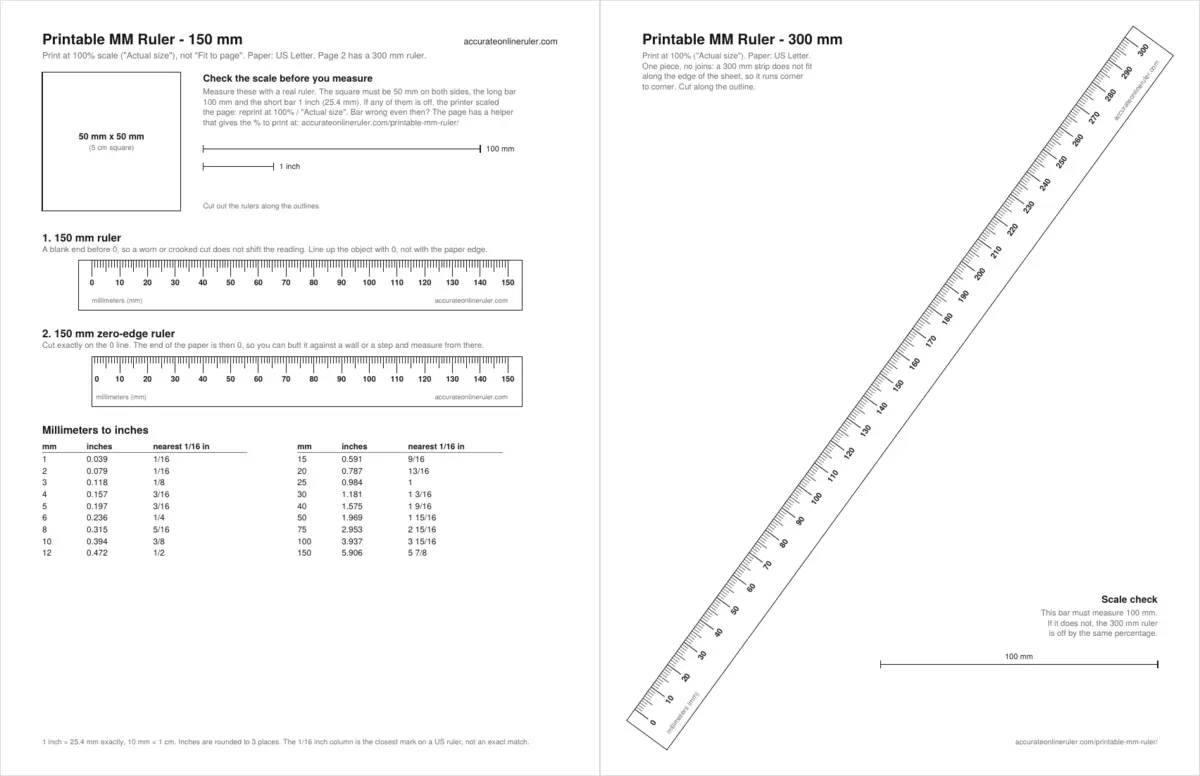
What's on the sheet
Both PDFs hold the same rulers at the same size. Only the paper changes, and on page 2 the angle of the long strip.
- Scale check. A 50 × 50 mm square, a 100 mm bar and a 1 inch bar. The square catches a printer that stretches one direction more than the other; the long bar shows small errors that a short one hides.
- 150 mm ruler. Marks for every millimeter, a slightly longer mark at each 5 mm, and a number every 10 mm. There's blank paper before 0, so a crooked cut can't shift your reading.
- 150 mm zero-edge ruler. Cut on the 0 line and the end of the paper becomes zero. That lets you push the ruler into a corner or against a wall, which an ordinary ruler with a blank end can't do.
- Mm to inches table. Eighteen common lengths with the decimal inch value and the nearest 1/16 inch mark, handy when a metric size meets a US tape measure.
- 300 mm ruler, one piece. Page 2 sets the strip corner to corner, at about 54° on Letter and 57° on A4, with a second 100 mm bar beside it.
How to print it at the right size
- Pick your paper. Download Letter if that's what is in your printer, A4 if not. Printing the wrong PDF on the other paper is the easiest way to get a scaled page, because many print windows quietly fit it to the sheet.
- Open the PDF in a PDF reader, not a phone photo viewer. A browser's built-in viewer is fine as long as it offers a scale setting.
- Set the scale. Choose 100%, "Actual size" or "No scaling". Turn off "Fit to page", "Fit" and "Shrink oversized pages". The wording varies between programs, and Adobe's printing help covers the same choice in Acrobat Reader: scale to fit the paper, or set a percentage yourself.
- Print one copy on plain paper first. Save the card stock until you know the scale is right.
- Measure the 100 mm bar with a real ruler or tape. Then measure both sides of the square, which should both be 50 mm.
- Cut out the rulers. Scissors work, but a craft knife and a straightedge give a cleaner line, which matters most on the zero-edge ruler and the long 300 mm strip.
If the printout is the wrong size
First go back and check the print settings, since a stray "Fit to page" is the usual cause. If the bar still comes out wrong at 100%, you can correct for it. Measure the long bar, type the result here, and the helper works out the scale to print at.
The page printed too small. Enter 103.1% as the custom scale, print again and re-measure the bar.
The sum behind it is simple: 100 divided by your measurement, times 100. A bar of 97 mm needs 100 ÷ 97 × 100 = 103.1%. Some print windows only accept whole numbers, so round to the nearest one and measure again. If the square is out by different amounts in each direction, the printer is feeding the paper unevenly and a single percentage won't fully fix it. Try a different paper tray, or use the rulers for short lengths only.
How to read a millimeter ruler
- Line up one end of the object with the 0 mark, not with the edge of the paper. On the zero-edge ruler, the edge is the mark.
- Look straight down at the far end. Viewing from an angle can move your reading by a mark, especially with paper lying on top of something thick.
- Read the last number passed. Each number is a count of millimeters: 30 means 30 mm.
- Count the small marks after it and add them. Three marks past 30 is 33 mm. The longer mark halfway between two numbers is the 5, so you can count from there when the end falls near it.
- Judge the gap. If the end falls midway between two marks, it's reasonable to call it a half: 33.5 mm. Going finer than that is guessing.
- Write the unit down. The standard form is a number, a space, then the symbol in lowercase, as in 33 mm. NIST's guide to the SI asks for the space even in phrases like "a 1 m end gauge".
The millimeter marks on this sheet are about 0.12 mm wide, so read to the center of the line. If you're new to this, the how to read a ruler guide covers both inches and metric, and the ruler reading practice quiz lets you try it on screen with instant answers.
Millimeters to centimeters and inches
There are 10 millimeters in a centimeter, and NIST records the inch as exactly equivalent to 25.4 mm. Nothing about those numbers is approximate. The rounding only comes in when a metric length has to land on a US ruler, which is marked in fractions. The right-hand column shows the closest 1/16 inch mark, and for most lengths it isn't a perfect match.
| mm | cm | Inches | Nearest 1/16 in |
|---|---|---|---|
| 1 | 0.1 | 0.039 | 1/16 |
| 2 | 0.2 | 0.079 | 1/16 |
| 3 | 0.3 | 0.118 | 1/8 |
| 5 | 0.5 | 0.197 | 3/16 |
| 6 | 0.6 | 0.236 | 1/4 |
| 8 | 0.8 | 0.315 | 5/16 |
| 10 | 1 | 0.394 | 3/8 |
| 12 | 1.2 | 0.472 | 1/2 |
| 15 | 1.5 | 0.591 | 9/16 |
| 20 | 2 | 0.787 | 13/16 |
| 25 | 2.5 | 0.984 | 1 |
| 30 | 3 | 1.181 | 1 3/16 |
| 50 | 5 | 1.969 | 1 15/16 |
| 100 | 10 | 3.937 | 3 15/16 |
| 150 | 15 | 5.906 | 5 7/8 |
| 200 | 20 | 7.874 | 7 7/8 |
| 300 | 30 | 11.811 | 11 13/16 |
For a length that isn't listed, use the mm to inches converter. To see how small these sizes are next to everyday objects, read how big is 1 cm and 1 mm.
Check the printout with a coin
No second ruler in the house? A coin will do for a rough check. These are the published sizes from the US Mint:
| US coin | Diameter (mm) | Diameter (in) | Thickness (mm) |
|---|---|---|---|
| Dime | 17.91 | 0.705 | 1.35 |
| Cent (penny) | 19.05 | 0.750 | 1.52 |
| Nickel | 21.21 | 0.835 | 1.95 |
| Quarter | 24.26 | 0.955 | 1.75 |
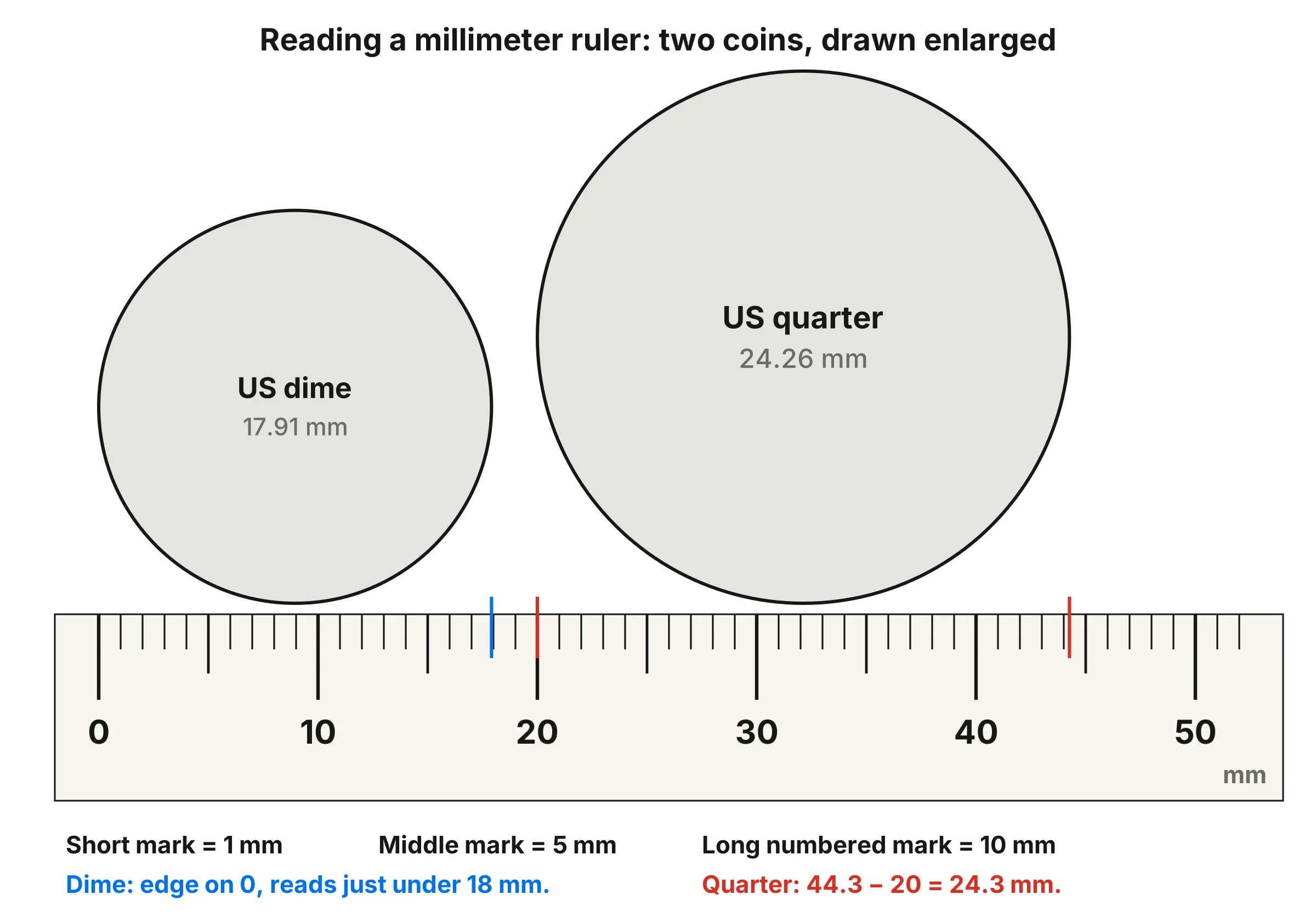
Set the coin's edge on 0 and read across the widest point. The quarter should land a little past 24 mm. A coin only spans about 20 mm, though, so a 2% error would change the reading by less than half a millimeter and could go unnoticed. Use the coin to catch a badly scaled page, and use a longer real ruler or tape on the 100 mm bar when you can. Outside the US, your own mint's published coin sizes work just as well. There's more on this in the US coin sizes guide.
Worked examples
Sizing a metric screw
Say you have a loose bolt and need to know whether it's M5. Hold the 150 mm ruler against the threads and read straight across the widest point. A reading of about 5 mm points to M5, because the number in a metric size is the nominal thread diameter. For a closer look at length, head shapes and pitch, see the screw and bolt sizes guide.
Measuring from the back of a shelf
You want to know how deep a recess is. An ordinary ruler has a blank end, so its 0 sits a few millimeters out from the back wall and every reading comes out short by that amount. Push the zero-edge ruler all the way in instead. If the front lip of the recess falls at 87, the depth is 87 mm.
Starting away from zero
A damaged paper end, or an object you can't line up with 0, doesn't have to stop you. Start at any number and subtract. In the diagram above, the quarter runs from the 20 mark to about 44.3, and 44.3 − 20 = 24.3 mm, which agrees with the Mint's 24.26 mm once you allow for what the eye can read. The same trick measures the distance between two holes: read the left edge of each hole, then subtract. A left edge at 12 and the next at 76 gives 64 mm, center to center, as long as the holes are the same size.
Measuring something too thin to read
A single dime is 1.35 mm thick, and that's hard to judge on a ruler with 1 mm marks. Stack ten of them and the stack comes to 13.5 mm, which is easy to read. Divide by ten and you're back to the thickness of one coin. This works for card stock, washers, sheets of paper and anything else you can stack evenly.
Fitting a metric size to a US tape
Your part measures 37 mm and your drill or tape is in inches. 37 ÷ 25.4 = 1.457 inches. In sixteenths, that's 23.3, so the closest mark is 23/16, or 1 7/16 inches. That mark is really 36.5 mm, half a millimeter short. Fine for a shelf, perhaps not for a press fit, so check how much the difference matters before you cut.
Which ruler to use
| You need | Best choice |
|---|---|
| Numbers in mm, on paper you can carry | This printable mm ruler |
| Inches to 1/16, or cm numbers | Printable ruler |
| A quick reading with no printer | On-screen mm ruler, after calibrating |
| Centimeter numbers on screen | On-screen cm ruler |
| Pupillary distance for glasses | Printable PD ruler |
| Classroom practice sheets | Ruler worksheets |
The on-screen rulers have their own limits, which are covered in is an online ruler accurate? If you want to compare Letter and A4 before you print, the paper sizes chart has both, and the A series itself is set by ISO 216.
Common mistakes
- Skipping the scale check. A page shrunk to 97% still looks like a ruler. Nothing on it tells you it's wrong until you measure the bar. A 300 mm strip printed at that scale is 9 mm short.
- Lining up with the paper edge. On the 150 mm and 300 mm rulers, 0 is a line printed 5 mm in from the end. Starting from the paper edge adds 5 mm to every reading.
- Cutting the zero edge by eye. On the zero-edge ruler, a cut 1 mm to the left or right moves the whole scale by 1 mm. Use a straightedge and cut right on the line.
- Reading a mark as a centimeter. The numbers on this ruler are millimeters. A reading of 25 is 25 mm, or 2.5 cm, not 25 cm.
- Measuring on a curve. Paper bends easily, which is handy around a wrist or pipe but gives a false length if the object is flat. Keep the strip flat and tight against the thing you measure.
- Printing from a phone preview. Some phone print dialogs scale to fit with no obvious setting to change. Check the bar, and print from a computer if it comes out wrong.
- Copying the printout. A photocopier can change the size slightly. Print each new ruler from the PDF, or measure the bar on the copy.
Tips for a better paper ruler
- Use card stock once the scale check passes. If your printer won't feed it, glue a plain-paper print onto thin card with a glue stick and let it dry flat before you cut.
- Print a spare or two. Paper ends wear quickly, and a fresh ruler costs one sheet.
- Cover it with clear tape if you'll use it in a workshop or a sewing kit. Lay the tape on before you cut, and keep it smooth over the marks.
- Keep the check square with the ruler if you can. It's a quick way to see that a saved printout really is the one you tested.
- Measure twice from different starting marks. If the 10 to 60 reading and the 20 to 70 reading agree, you're reading it consistently.
- Use calipers for tight fits. A printed ruler is the right tool for sorting, marking and everyday sizing, not for machining tolerances.
The bottom line
A printed mm ruler is as good as its scale, so the one step that matters is measuring the 100 mm bar. Get that right and you have a free, accurate-enough ruler in two lengths, including one that starts at the very edge of the paper. If you need it on screen instead, the mm ruler does the same job after a quick calibration.
Frequently asked questions
How do I print a ruler at actual size in mm?
Open the PDF, choose 100% or "Actual size" in the print window and turn off "Fit to page" and "Shrink oversized pages". Then measure the 100 mm bar on the sheet with a real ruler. If it measures 100 mm, the ruler is the right size.
Can I check the scale without another ruler?
Yes. Use a coin of known size. A US quarter is 24.26 mm across and a US penny is 19.05 mm. Lay the coin on the printed ruler: the quarter should read a little over 24 mm and the penny a little over 19 mm. A coin is a short check, so a small scaling error is easier to spot on the 100 mm bar.
How does a 300 mm ruler fit on one sheet of paper?
It runs corner to corner. Letter paper is 279.4 mm long and A4 is 297 mm long, so 300 mm cannot fit along the edge, but the diagonal of each sheet is more than 350 mm. That leaves room for the whole strip in one piece, with no join to line up.
What is the difference between this and the printable ruler in inches and cm?
This sheet is numbered in millimeters (10, 20, 30) and has a zero-edge ruler and a mm to inches table. The printable ruler has inch scales marked to 1/16 inch and centimeter scales numbered in cm.
How many millimeters are in a centimeter and an inch?
There are 10 mm in 1 cm, and exactly 25.4 mm in 1 inch. To turn millimeters into inches, divide by 25.4. To turn them into centimeters, divide by 10.
What if my printer always prints a little too small?
Type the length of the 100 mm bar into the helper on this page. It gives the percentage to enter as a custom scale. If you measure 97 mm, print at 103.1%, then measure the bar again.
How precise is a paper mm ruler?
You can read it to the nearest millimeter, and to about half a millimeter with care, as long as the scale check passes. For parts that need a closer fit than that, use calipers.